Booking an Appointment
Recording a booking, whatever calendar your clinic uses
When a lead says yes, click Booked and record the appointment. Recording it here matters even if you also book it elsewhere: it stops the call schedule, moves the lead to Booked, and lets your clinic track whether they show.
How booking works depends on your clinic's setup
Your clinic picks one in Settings → Calendar for booking.
Your clinic books in | What you do |
|---|---|
Your booking system, connected (Boulevard, Mindbody, Zenoti, Meevo, Setmore) | Click Booked, pick a day and an open time, click Book. It's booked in your system automatically |
A HighLevel calendar | Same: click Booked, pick a day and an open time, click Book |
Your own booking page (not connected) | Book the patient in your own system first, using the Open booking page link. Then click Booked and type the same date and time |
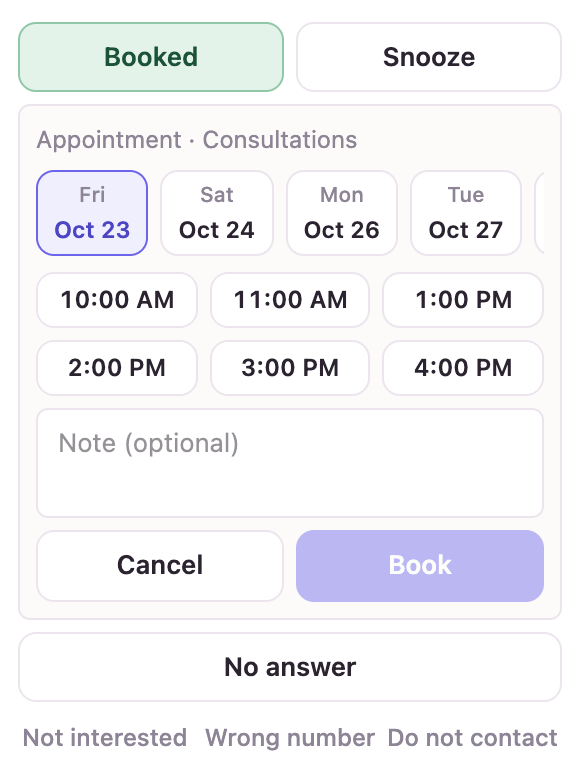
The form shows the next days with open times. Pick one, add a note if you need to, and click Book. If no times show, there's nothing open in the next two weeks; check with the clinic.
Right after you book
Take a card (see Taking a card or deposit), ideally while you're still on the phone.
Confirm by text: the date and time, the address and parking, and anything they should do before the visit. Your clinic's details are in the Info window.
Click Next lead →.
Booking someone who isn't in a campaign
Sometimes a person calls or texts who never came through an ad, like a referral or a walk-in inquiry. Their outcome panel only shows Booked. Click it, pick the campaign they belong to or choose Somewhere else… and type the source ("Instagram DM", "referral"), then book as usual. They're added quietly: no texts, calls or alerts start for them.
Reminders
Automatic appointment reminders from the Contact Center are on the way. Until then, use your booking system's own reminders, and call the day before to confirm.
Did this answer your question?
Thanks for your feedback!