
Media Creation Guide
To make launching campaigns as easy as possible, we provide ready-to-go image & video creatives that accompany our recommended offers.
You can find our recommended offers and accompanying creative through two sources:
- The Offer Catalog in the campaign builder section of your software (see all our offers & media on one page)
- Campaign Catalogue (browse through all offers in a catalogue format)
How To Edit Canva Templates
Visit the How To Edit Canva Templates training for instructions on making edits to our Canva templates.
You can either use the creative templates as is, make small edits, or use your own images and videos to maximize performance.
Benefits Of Using Your Own Images & Videos
Using your own images and videos in your ads allows you to showcase your unique services, space, and team in a way that is not possible with templated media.
As a result, you will experience lower lead costs and more appointments.
HOWEVER, it is crucial to only include the right kind of images and videos in your ads.
Uploading the wrong content can increase your lead cost and make your hard work go to waste.
This is why it’s super important to follow our creative guidelines when deploying your own images and videos. This training will show you the way. 🤝
Image Content Guide
The easiest way to customize our creative templates is to use still images.
Your photos do NOT need to be fancy. In fact, candid smartphone shots tend to perform the best. If capturing the content takes longer than a coffee break, you’re doing it wrong.
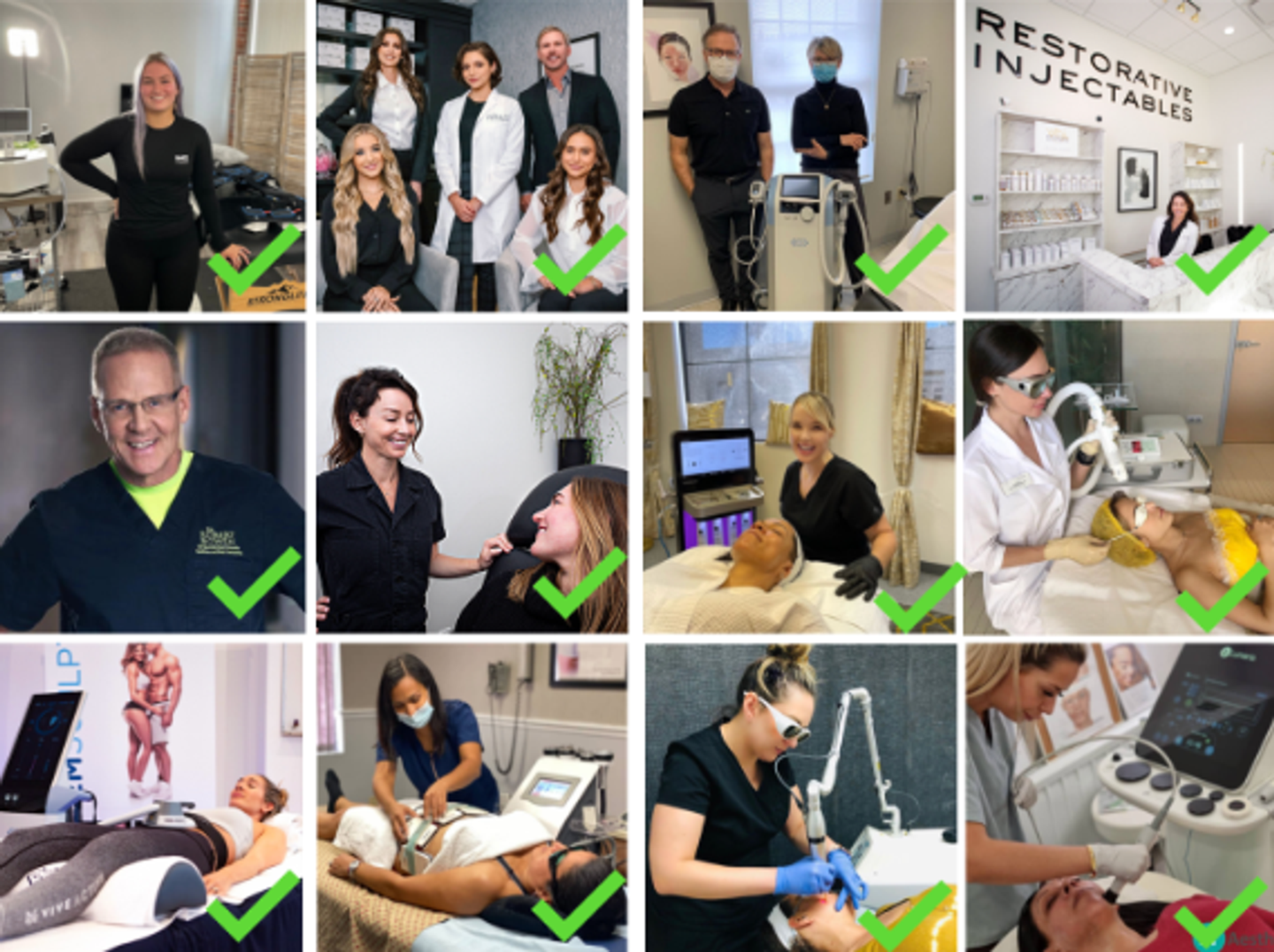
Types of images that work best:
- Smiling staff members making eye contact
- Staff interacting with clients
- Treatment demonstrations
Types of images to AVOID:
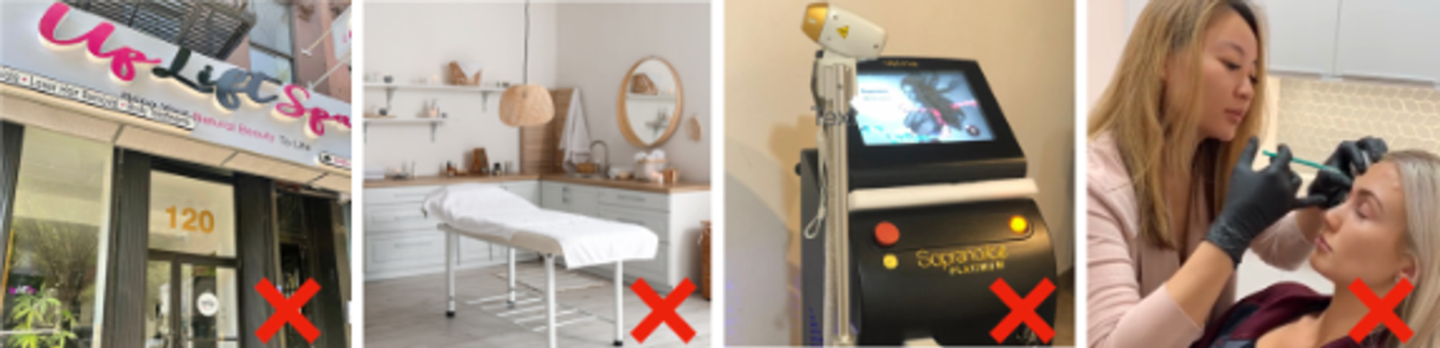
- Photos without people
- Stock images from the equipment manufacturer.
- Before & after photos (against META policies)
- Needles, blood, accentuating a particular body part, like squeezing jowls or love handles. (against META policies)
✅ BEST practices for taking photos:
- Choose a clean, bright, and clutter-free space (preferably a neutral background like a white or beige wall).
- Use natural lighting near windows OR ring lights for even illumination.
- Keep your camera lens clean and wipe your phone camera before shooting.
- Make sure background noise is minimized (if recording video).
- Use a modern smartphone (iPhone 11 or newer, Samsung S10 or newer) or a DSLR camera.
- Take photos in portrait mode (vertical) for social media stories/reels, or landscape mode (horizontal) if asked for YouTube/website use.
- Center yourself or the subject, keeping head and shoulders fully in frame.
- Keep the camera at eye level to avoid awkward angles.
❌ WORST practices for taking photos:
- Shoot in messy, dim, or overly busy locations.
- Use harsh overhead fluorescent lighting that creates unflattering shadows.
- Record where there’s loud talking, TVs, or music in the background.
- Film with shaky hands — use a tripod or prop your phone on a stable surface.
- Use filters that distort the skin, features, or colors.
🎥 Video Content Guide
If you want to step it up a notch and boost campaign performance, it’s time to incorporate video.
Using Video For Ads (Paid Campaigns):
These videos should capture attention quickly and highlight results, procedures, or benefits.
✅ Best Types for Ads:
- Real-Time Procedures (e.g., microneedling, facials, lasers, consultations or demonstrations)
→ Show a short clip of the treatment being performed in a professional, calm setting. - Client Testimonials (quick and real)
→ Focus on the transformation, experience, or emotional benefit. - Treatment Benefits / FAQs
→ Example: “Here’s what to expect with your first lip flip” or “Does microneedling hurt?”
⚠️ Keep it concise — under 30–45 seconds is ideal. Use captions if there’s talking.
Look For: People, Eye Contact, Smiles, and Treatment Demonstrations.
Examples
Using Video For Organic Posts (Reels, Stories, Grid, etc.):
Use these to build trust, personality, and behind-the-scenes connection.
✅ Best Types for Posts:
- Day-in-the-Life (staff intros, spa walk-throughs, team moments)
→ Helps followers connect with your brand. - Fun/Myth-Busting Tips
→ Show personality and educate lightly (“Do facials make you break out?”). - Client Testimonials
→ Longer, more personal versions work well here too. - Behind-the-Scenes Prep or Post-Treatment
→ Example: mixing a mask, setting up a room, post-treatment glow
✅ BEST Practices For Taking Videos
- Utilize natural light or use a ring light where needed
- Keep it under 60 seconds unless it’s a deep-dive
- Film in vertical mode (portrait) for Reels/Stories
- Keep audio clear — mic if possible, avoid music or noise
Media Sizing Guide
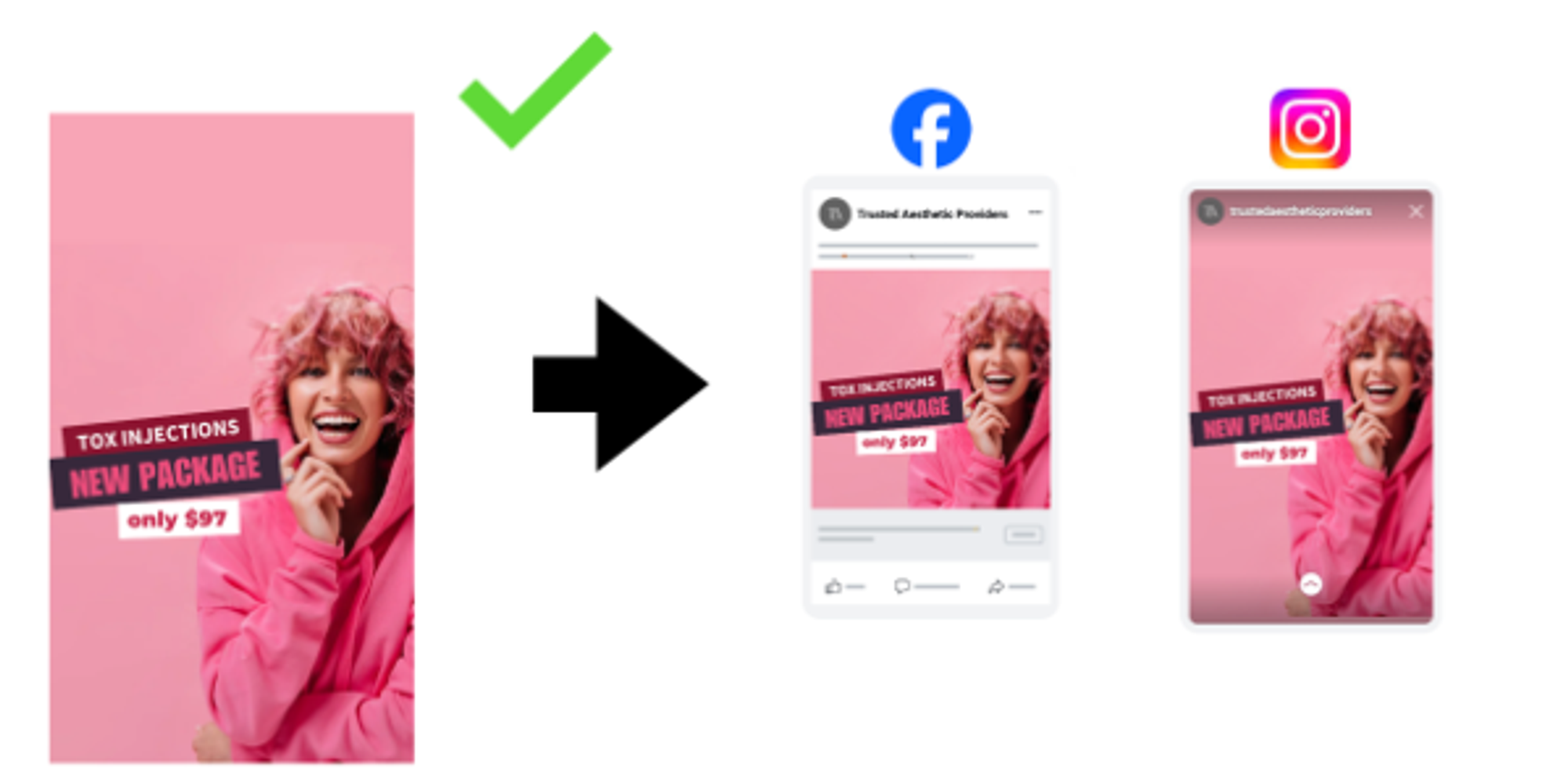
When you post an ad on Meta, you get access to several different ad placements across Facebook and Instagram, and the content is sized slightly differently on each placement.
To make things as simple as possible, we recommend using a single file that fits all placements.
To do this, use a single file that is 1w x 1.8 h (in pixels 1080w x 1920h), and place all important text and images in the middle third of the image. If you follow this approach, the image will appear correctly on all placements.
If you place important text or content outside of the middle third, it will be cut off on shorter placements.
How To Get Help From The Forever Booked Team
Please send all final images and videos to support@foreverbooked.com. If your files are too large to email, kindly upload them via Dropbox, WeTransfer, or Google Drive.
When submitting your files, please name them clearly using the following format:
PracticeName_Campaign Name (e.g., Foreverbooked_Lipflip).
Our Content Creation team not only edits your content — we elevate it to ensure it looks absolutely amazing. Your finalized content will be ready for launch within three (3) business days.