Place signage throughout your clinic to prompt clients to ask you about the program. If you haven’t yet, customize and print out your in-office signage using our Canva templates.
Ask clients if they would like to participate! The best places are in the treatment/consultation room or at checkout.
“Have you heard about our new referral program?”
>> No, I haven’t
“Every time a friend you refer comes into the clinic, they get a $200 credit, and you get $100. We even give a [referral incentive] just for filling out a referral form. Interested?”
>> Sure
“All we need to do is get the names and phone numbers of your friends who may be interested. Do you have anyone off the top of your mind? Some people like to check their recent text messages to jog their memory.”
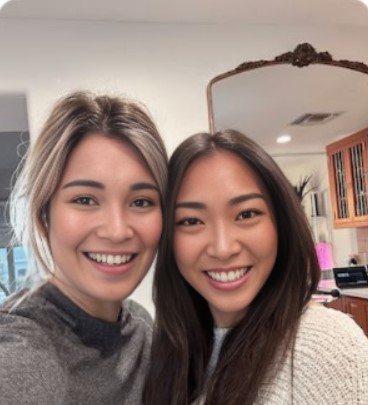
When the client fills out the referral sheet, we highly recommend taking a selfie with them so that it can be included in the text. Just say: “People don’t like texts from strangers and would rather see a picture of your beautiful face!”
Have fun with this part!
Step 3: Enter referral sheet submissions in the referral entry page
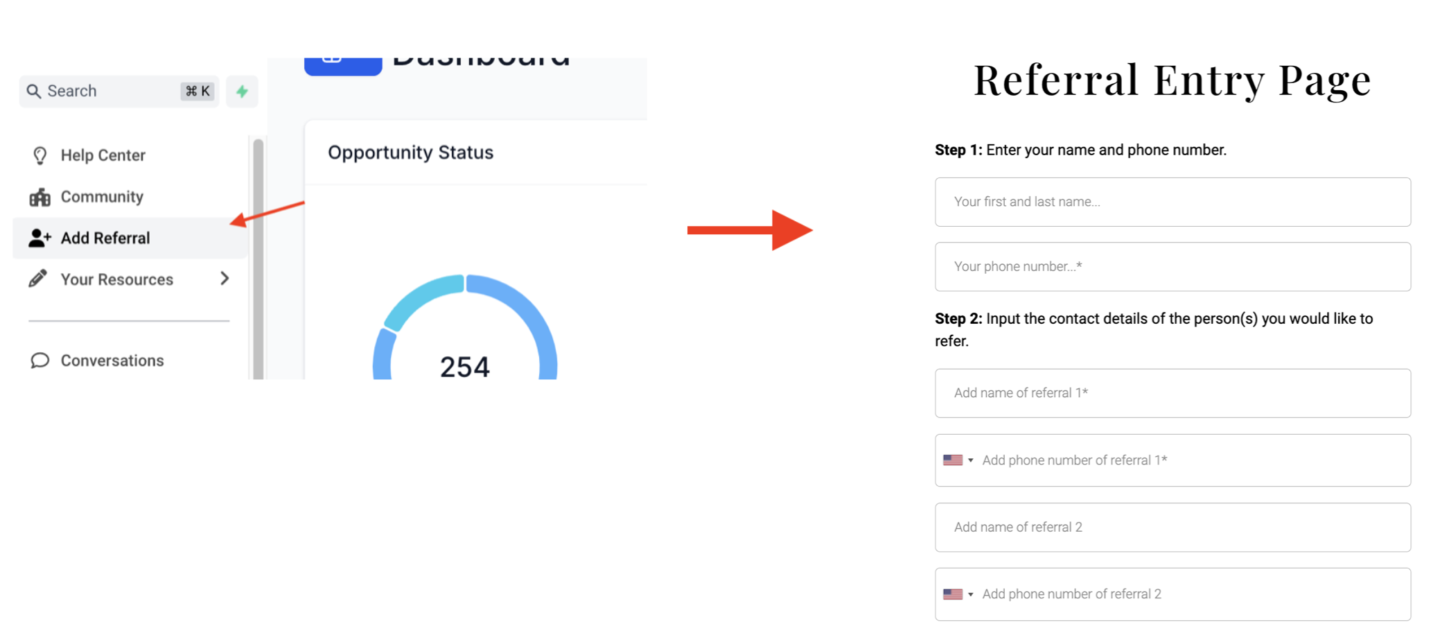
Click “Add Referral” in your GHL account to open your referral submission page.
After the physical collection sheet has been filled out, enter the submissions in the Referral Entry Page along with the name and phone number of the client who filled out the sheet.
Referral Booking Process
Here’s what happens when you submit the Referral Entry Page:
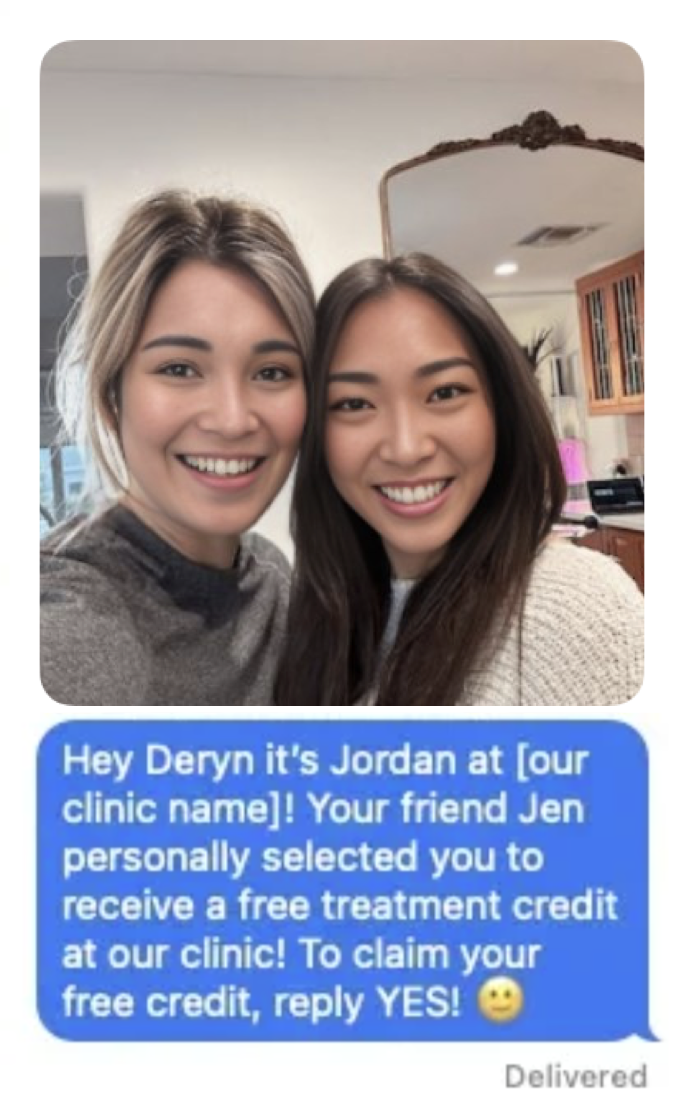
Every contact entered in the form will be sent a text like the one below. (They will only receive a selfie if you upload one.)
Our system will follow up with everyone and notify you if they are interested in booking an appointment! Those who are interested will become HOT Leads.
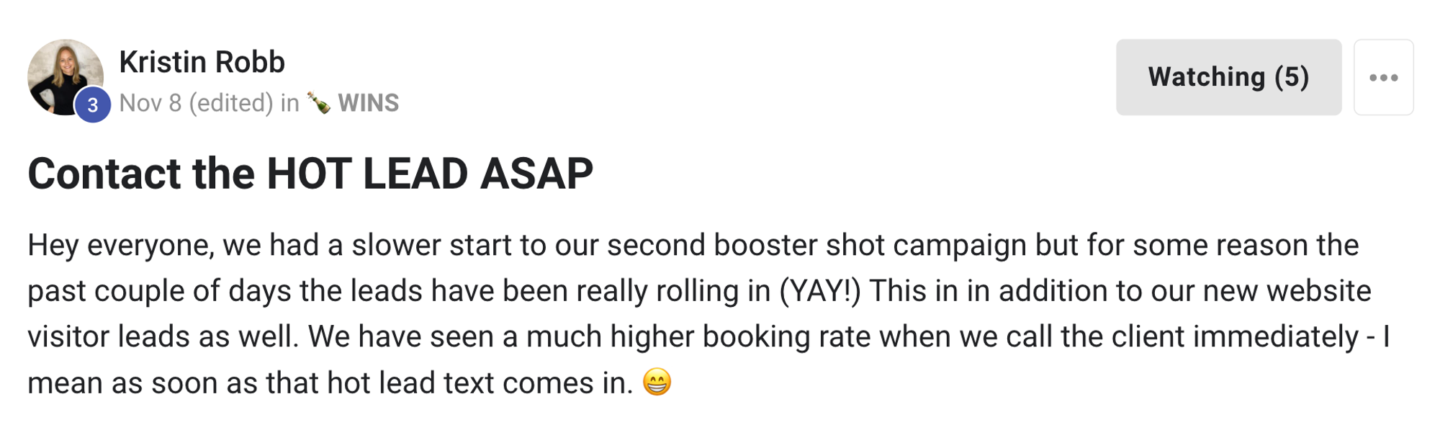
Contact Hot Leads as soon as you receive them! (You will receive a notification.) Don’t wait a day, an hour, or even 15 minutes. Try to contact each Hot Lead within 5 minutes. The sooner, the better. Visit the Hot Lead & Appointment Booking Workflow for further instructions on contacting Hot Leads.
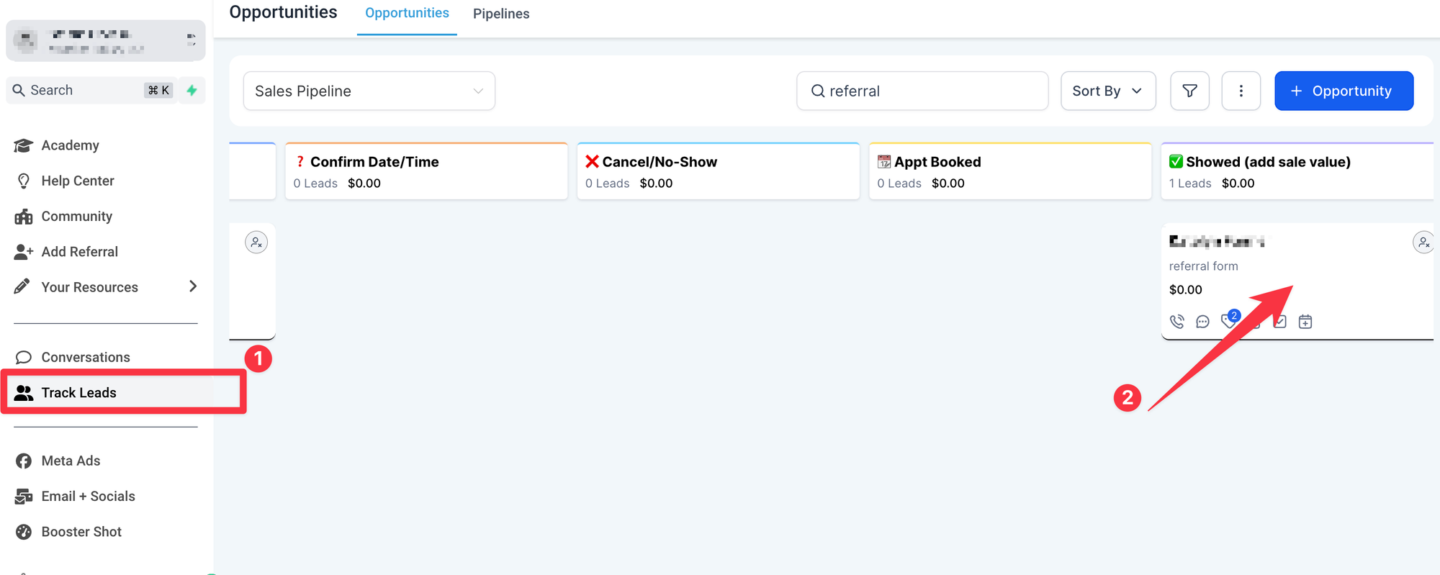
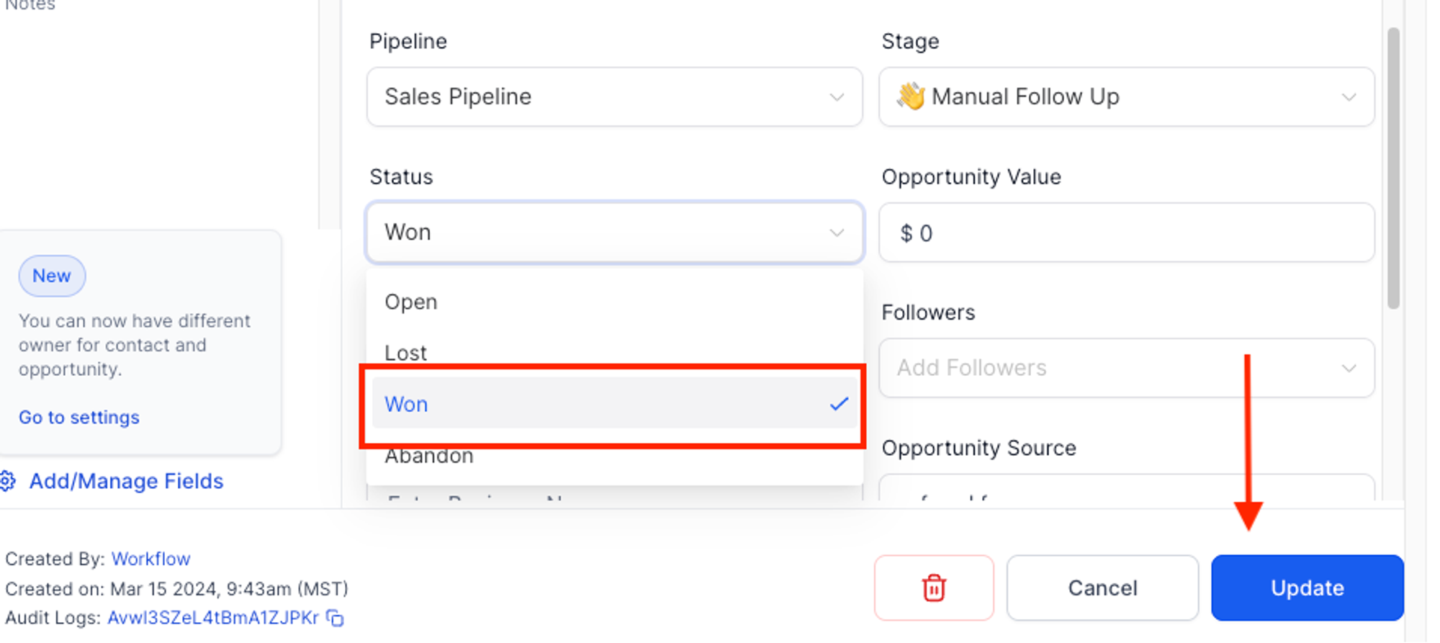
When a referred client comes in and makes a purchase, move them to ”✅ Showed (add sale value)” and mark them as “WON”.
Go to “Track Leads” and open the contact opportunity card. Move to ”✅ Showed (add sale value)”
Under status, select “Won”, and click “Update”.
When you mark an opportunity as “WON”, a text will be sent to the person who referred the new customer, notifying them that their referral has made a purchase, and they have 90 days to use their new credit.
Referral purchase notification text:
Congrats [contact]
Your friend [referral name] has made a purchase! Thank you so much for the referral!
Your account has now been credited with $100!
This credit is valid for 90 days, please text or call us to book! :)
Transcript
0:00 Video on this training is gonna walk you through all the steps you need to follow to start getting referrals with the system.
0:06 Before you do this though, make sure you first watch the overview video it explains the theory behind the system why we structured the way we do.
0:12 It's really important to understand that. Make sure you gone to the setup guide and you've requested your referral system. You go through that you gone to the setup checklist to set everything up, including your intake forms and your in office signage.
0:24 Once all that's ready, you're start to act, you're ready to start actually collecting referrals. So the first step is to get clients to fill out the referral sheets and the way you do this is by starting conversations.
0:36 One of the best ways to start conversations is to have the signage placed predominantly throughout your clinic. So as I reviewed in the setup guide, we have these Canvas templates that have these big sexy headlines with the benefit that people get when they refer their friends.
0:50 So when you have this around your clinic, you're going to have clients bring this program up. Obviously, you and your staff want to be super excited about this.
0:57 you want to be talking about it all the time and hyping people up. But it helps if your clients are also bringing it up as well.
1:03 And you can do that by printing out and displaying these in office signage. So a great way to, you're going to say, hey, have you heard about our new referral program?
1:13 You want to ask people, you know, when they're in the consultation room, the treatment room, when they're super happy, even at checkout, you want to constantly be bringing this up.
1:20 Because really like you should you should truly believe in this program and you know it's a great the the way you structure the benefits like who doesn't want to get a hundred dollar credit who doesn't want to give their friends credits so you want to be you know spreading the gospel about this program
1:35 all day every day in your clinic. Another great thing to say is look if people are just purchased a treatment package for their skin who doesn't like to also go through this skin transformation process with their friends right so you can ask them do you have any friends that might like to go through
1:49 this process as with you who might like to get great skin with you, who might like to do some body contouring with you, right?
1:54 So that's just a whole other angle. You can even use this program to negotiate discounts, right? If someone wants to better discount, you can say we usually don't, but if you give some names and phone numbers of your friends, we can do discount.
2:06 And I talk a bit more about that in this overview video here. So if they haven't heard of it, you just quickly explain the benefits.
2:12 Hey, with this program, you write down the names and phone numbers of your friend in the sheet of paper. We're gonna message them.
2:18 If they come in and buy something you're gonna get a hundred dollar credit They're gonna get a two hundred dollar credit and everyone wins.
2:23 They're gonna say, yeah, sure I have some people they may not have some people all the top of their mind You can always tell them to go through their phone like go through their messages to jog their memory and get them to fill out some people So you at least want to get them to fill out one friend ideally
2:36 five friends but between one two five Names and phone numbers and you enter them in this referral collection sheet You get them to write it down with a pen and paper because people are they're a condition to do that And it's just very easy to get them to fill out a physical sheet.
2:51 Next step is to take a selfie with the client. So some people are like, oh, wow, I do this. But honestly, once you start doing it, you're going to have a lot of fun with it.
2:58 And the reason you do it is because if you just send, if you receive a text from a stranger, even if it has a $200 gift card, you're going to be skeptical, right?
3:08 But if that text contains a selfie of your best friend, along with the provider at the Med Spa, it creates that connection.
3:14 So try to take a selfie with the client. you don't have to, but it will 100% boost your conversion rates for the program.
3:21 So you take this selfie, step three is to enter the referral sheet submissions in the referral entry page. So when you go into your software, once you've requested your referral system and it's set up, when you click this link, add referral, it's going to open up this referral entry page.
3:35 And in the entry page, you're going to enter the name and phone number of the person that's referring and then the names and phone numbers of up to five
3:46 And just to give you a live example of the page looks like it's going to look just like this you enter the name and phone number of the person referring to the person filling out the sheet and then the names of phone numbers up to five of their friends you put those below you upload the selfie right
4:01 here and then you click submit. So once you hit submit on that page here's what's going to happen the first thing that that were submitted in that form They will receive a text message if there is a selfie submitted They're gonna receive the selfie along with the text message Obviously not this exact
4:16 photo. It's gonna be the selfie of the provider and the person referring if there is no selfie, it will just be this text message.
4:23 And then our system is going to follow up with everyone that was sent the message. So people are going to reply, they're going to be interested or not.
4:29 The ones that are interested will follow up with them and will get them converted to a hot lead. So just like any other campaign with our program, just like a meta ads campaign or a booster shot campaign, a hot lead is someone who's interested in coming in.
4:42 And it's your job to contact those people as soon as possible. Don't given a feedback and proved and vouched. Again and again, our top clients say that the key to this program is to contact the hot leads ASAP.
4:55 So you want to contact them as soon as they come in, follow our hot lead appointment booking workflow for instructions on how to follow up with them and get them booked.
5:03 Next is step four. So once that person comes in and actually purchases something, you're going to move their opportunities. So they're going to be in the opportunity sales pipeline.
5:13 You want to move them over to appointments showed. And then what you're going to do is you're going to click on the opportunity pane there.
5:20 You're going to open it up and you're going to mark them as one. You can optionally add how much they spend.
5:25 You don't have to do that, but it's recommended to track how much these people spend. And you're going to click update.
5:30 Now this is super important. When you click one and click update, it's going to trigger the system to send a text to the person that referred that person letting them know that their friend So the text is going to look like this.
5:47 Hey, your friends made a purchase. Thank you so much for the referral. expiry and you want to make sure you follow up with these Now this is not integrated with your EMR.
5:58 So it's not gonna automatically add that credit to your EMR You have to do this manually this system is designed to communicate credit.
6:05 So that is a full system for the referral row so So that's a set by set for the referral rocket system.
6:11 You really don't need to over complicate this all All you need to do is start conversations and start filling out the form You'll start getting bookings, and it's really cool to start seeing it happen.
6:22 it's