This training will show you how to track overall ROI from all marketing activities with the Forever Booked program.
To track ROI for individual META ads, please visit the Ad Performance & Optimization module of the META Ads Training.
Marketing: Investment VS Expense
Marketing should be viewed as an investment rather than an expense.
Expenses are meant to be reduced. Investments are meant to be continually increased (IF) they are delivering a positive return.
The issue is that it can be difficult to match marketing dollars with their return. As a result, most clinics see marketing as an expense to control, not an investment to grow.
This guide shows you how to track your returns from Forever Booked so can confidently invest in marketing to grow your clinic.
Let’s dive in!
How To Track Marketing Metrics
Follow these 2 steps below to track your Forever Booked marketing metrics:
Step 1: Record Appointment Outcomes Daily
Using the “Track Leads” tab in your software, you can record the outcome of each appointment generated through Forever Booked.
Best practices:
- Always track appointment outcomes daily. Do not wait for the end of the month or even the end of the week. This makes it difficult to go back and remember all the appointments.
- Always record the TOTAL sale value, even if the cash was not all collected upfront. For example, if the total package value is $1000 and they paid $500 upfront, record “$1000” for “Opportunity Value”
- Always mark the opportunity as “WON” when you make a sale. If it is not marked as “WON”, the sale will not transfer over to the reporting tab.
Step 2: Update ROI Tracking Sheet Monthly
Our program includes a simple monthly ROI tracking spreadsheet to record revenue and expenses related to Forever Booked.
To access this spreadsheet, go to your software and click on Resources -> “Annual Plan & ROI Tracker”.
You can also make a brand new copy of the document by accessing the template HERE.
At the end of each month, update your ROI Tracking Sheet with the following metrics:
Ad Spend: How much total you spent on ads for the month.
FBKD Fees: How much total you spent on Forever Booked for the month.
FBKD Revenue: The total revenue generated through Forever Booked for the month.
How To Calculate FBKD Revenue:
Assuming you have followed Step 1 correctly, your Forever Booked revenue will be calculated in the Reporting > Track Results tab of your software.
Simply set the date range for the month you are reporting for and your sales for the month will be shown under “Opportunity Value”
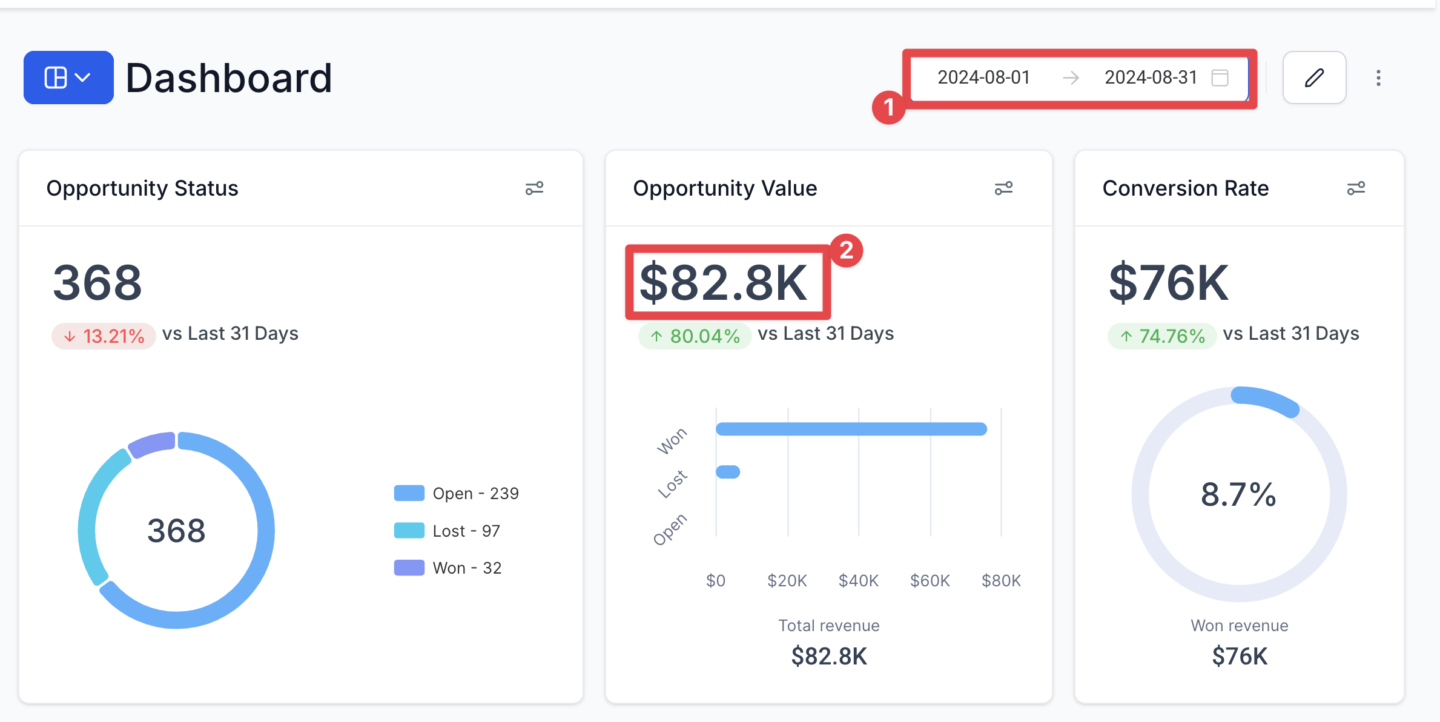
New Patients: How many new patients acquired through Forever Booked for the month.
New Patient LTGP: This is how much the average new client goes on to spend with you over their lifetime, minus your fulfillment costs. Follow How To Calculate LTGP training for instructions on calculating New Patient LTGP.
Transcript
0:00 Alright, welcome to this new finance and strategy training and in this particular video, I'm going to show you how to track overall ROI with the Forever Booked program.
0:09 So this is going to show you how to track your entire marketing return with their program, taking to count your expenses.
0:14 It's not going to talk about tracking return for individual Facebook ads or campaigns. Visit the ad performance and optimization training for that.
0:23 That's going to show you how to figure out which campaigns are performing so you can turn ads on and off.
0:27 But this training is more about overall marketing return for our entire program. So first, we need to understand that marketing should be viewed as an investment rather than an expense.
0:38 So expenses are meant to be reduced. Investments are meant to be continually increased if the big caveat, if they're actually delivering a positive return.
0:46 So the issue is that it's difficult to match marketing dollars with their returns. It's just a very difficult thing to do historically with small businesses.
0:53 And so as a result, most clinics, they see marketing has an expense to control rather than investment and investment to grow.
1:00 So they're kind of just like throwing stuff at the wall, seeing what sticks, but with no actual tracking to figure out what's working.
1:06 So this guy is going to show you how to track your returns with forever books. You can confidently invest in marketing to grow your clinic.
1:13 It's super important to do this, whether you're, you know, a solar prer knower or you want to justify this expense to the rest of your team.
1:20 You need to track this stuff in order to know that your marketing is actually working. So how to track marketing metrics.
1:26 It's the most important steps to follow are as follows. So step one is to record appointment outcomes daily. You want to do this in the track leads tab in your software.
1:37 And we actually have a tutorial on how to do this. You can open up this article. So in your track leads, you're going to have this pipeline here.
1:44 And then whenever someone comes into your clinic and purchases something, they're going to be all checked through the pipeline with our software, and when they come in and purchase something, you want to record the sale value in the software.
1:55 So what you do is you drag them to showed purchase, you click on the opportunity card, you mark them as one, and then you mark the opportunity value.
2:03 It's really important. By the way, you can do this through the Track Leads tab or also through conversations, you can edit the opportunity right from there.
2:11 It's really important to mark the total sale value, you're not just cash collected. So for example, if you saw a $4,000 package, the only collect $2,000 upfront, just record $4,000 for the opportunity value.
2:24 So you wanna do that as sales come in and there's a couple good practices, best practices for this. So firstly, you always want to make sure you track the appointment outcomes daily.
2:35 Don't wait for the end of the month or even for the end of the week because what happens is you forget what everyone did and it just takes too much time to go back and remember all the appointment outcomes.
2:43 Like I mentioned earlier, record the total sale value. So if you're collecting half cash upfront, record the total sale value, the package value, and always mark the opportunity is one.
2:53 If it's not marked as one, it won't transfer over to the reporting tab which I'm going to talk about shortly, that tallies up your total sales for the month.
3:01 So step two is record or update your ROI tracking sheet monthly. So our program includes a simple ROI tracking spreadsheet to record all your revenue and expenses is related to your favorite book.
3:11 To access the spreadsheet, we're going to link to your software under resources. It's called the annual plan and ROI tracker.
3:19 This is the new resources that we created. And so you're going to open it up here. You can either in your software, there's going to be one of these in your software.
3:29 If it's not reached out to our team, it will add it to your software. If you want it outside your software as a standalone resource, you can also just make a copy of this resource.
3:38 So if you click here, file, make a copy, you can just name it your business. So my med spa, annual plan, ROI tracker.
3:47 So it's going to make a carbon copy of this tracker to track your revenue. So I'm not going to talk about the planning part.
3:54 This is, we'll be another training. We'll show you how to use our campaign planner, social planner. You want to go head on over to this ROI tracking tab.
4:02 And let me just explain to you how this sheet works. So it's comprised of the following metrics that you want to update at the end of each month.
4:10 So the first one is ad spend. This is how much you spend on ads for the month. So at the end of the month, you're going to go in here.
4:15 Let's say January. If you spent $1,500 on ads, you're going to type in $1,500. There's different ways to get this figure.
4:21 You can look in your software, in your ads reporting. You can look at your credit card statements. You can just do the math.
4:26 If you're spending $50 a day, it's going to be roughly $1,500 for the month. So however you want to get this figure entered in there, it doesn't have to be exact.
4:33 just needs to be, you know, to the couple of dollars accurate. So that's your ad spend. Your second thing is going to be forever book fees.
4:41 So our Forever Booked fee is $2,000 a month. If you're just getting started, you can enter the upfront eight-week fee as well, but this is our monthly fee that you'd enter in.
4:50 And then it's going to get your total marketing fees. So, so far, we've recorded the ad spend in forever book fees.
4:55 And that's going to get your, it's just going to add up to get your total marketing fees for that month.
5:01 Next, Next, we have Forever Booked Revenue. So this is the total revenue generated through Forever Book for the month, how to calculate this figure.
5:09 So if you followed Step 1 correctly, you're going to be recording all your appointment outcomes as they happened. And when you mark them as one, they're going to show up in your reporting track results tab in your software under Opportunity Value.
5:21 If you set this range here to be the month that you're reporting for, it's going to total up your total sales for that month and give you that figure.
5:29 So all you need to do is record that figure and enter it right here for federal book revenue. So that's going to enter your revenue for a month.
5:37 And then the next two things you want to record are your new patients. So there's a number of ways to calculate new patients, whether you want to calculate, whether you have a tag in your main CRM that mentions where someone came through federal book.
5:49 Maybe just a spreadsheet you have, but whatever way you do it, just make sure you're tracking how many new clients are generating through for ever generating for a book, it's super important to have that figure.
6:00 And then next we have new patient LTGP. So what the heck does that mean? This is the average new client, how much the average new client goes on to spend with you over their lifetime minus fulfillment costs.
6:12 So this is a modification of the more common LTV metric, which stands for lifetime value. I prefer to use LTGP because it calculates the value minus your fulfillment costs.
6:23 So lifetime value that doesn't That just means how much someone spends with you over the lifetime but it doesn't take into account the actual fulfillment cost of delivering those services.
6:35 So when you get the LTGP, it's a more conservative metric but it's more accurate because it shows you the actual gross profit generated from that client rather than just revenue.
6:44 So it's actually one of the most difficult metrics to track LTGP. So, as a start, we recommend, well, I got to fix that typo there, we recommend entering $1,000 as a conservative figure.
6:56 The LTV for MedSpaz, like if you just chat GPT at its anywhere from like, you know, $2,000-,000 to, you know, $5,000-$10,000 for a lot of different practices, but as best to just stay conservative enter 1,000, and then I'm going to be releasing a training soon on how to more accurately calculate LTGP
7:13 for your clinic. So that's it for this module, the next module I'm going to show you how to like look at these numbers How to analyze them and use them to make informed marketing decisions with every book
